
Escrow –
Transaction Security
A transaction guarantee service from iPaymu, where iPaymu acts as an Independent Third Party that secures transactions between two parties: the Buyer and the Seller.
Activate in 30 Seconds
The primary vision of Escrow is to
This service aims to secure transactions made by Buyers on merchants integrated with the iPaymu payment system. With Escrow, the payment (funds) will only be received by the merchant once the buyer performs a "Transaction Confirmation".
This Escrow service is automatically enabled (by default) for Payment Links and integrated merchant Webstores/Platforms if activated by the buyer (customer) shopping at an iPaymu Merchant.
It will be an option for Buyers during the payment process (can be enabled or disabled).
Escrow Flow without Payment Link
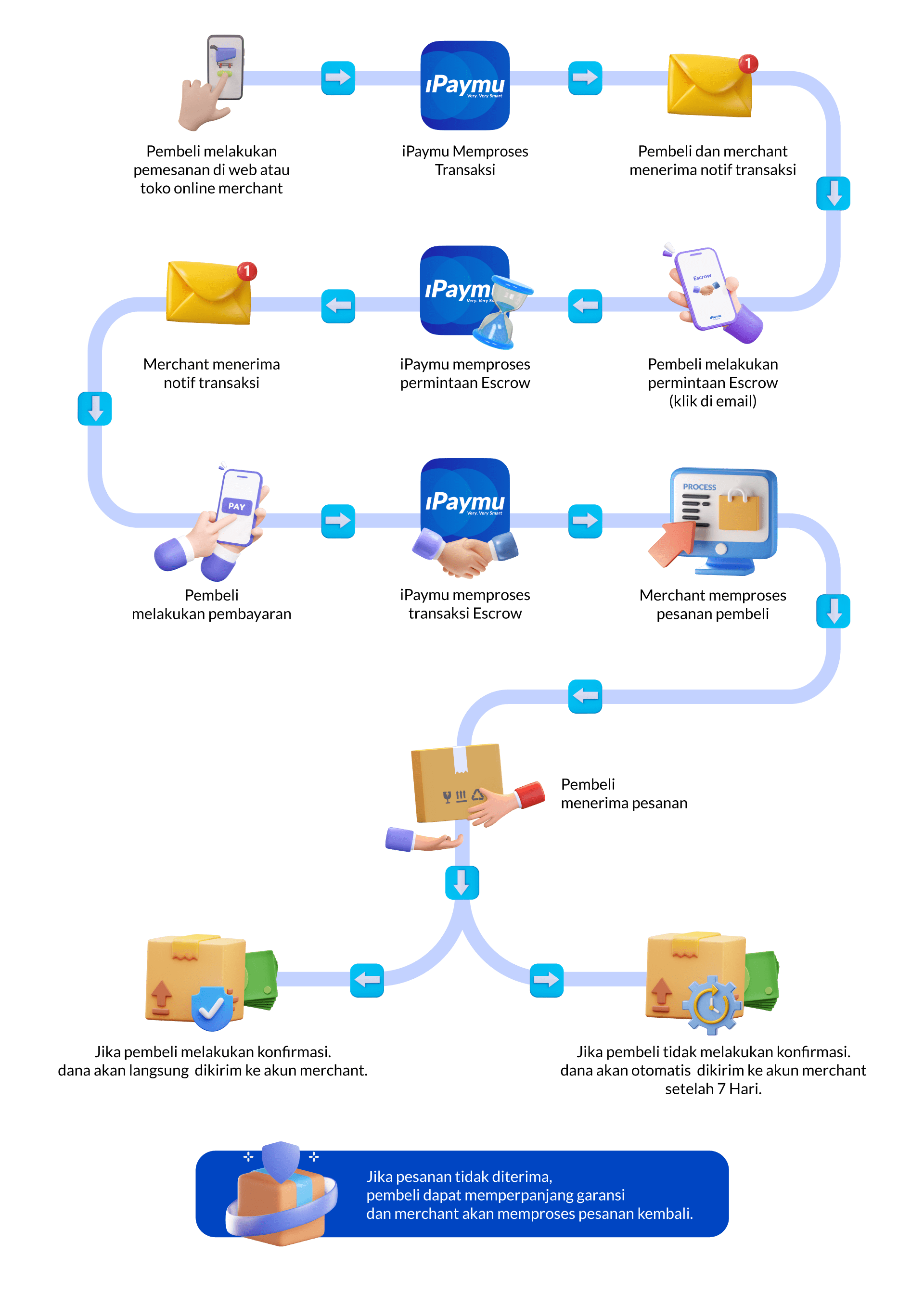
Automatically Enabled
All transactions via Payment Links will automatically become Escrow Transactions, specifically for Bank Transfer payment methods (VA & Unique Code).
Bank Transfer (VA & Unique Code)
In addition to Payment Links, Escrow can also be activated by buyers for Bank Transfer payment methods (VA & Unique Code). This serves as an option for the buyer, as it can be enabled or disabled.
COD, CStore, CC, QRIS
For COD, Convenience Store, Credit Card, and QRIS payment methods, the Escrow feature is currently not supported.
Funds Received After Confirmation
Funds will only be transferred to the seller after the Escrow is confirmed by the buyer.
Automatically Confirmed in 7×24 Hours
Escrow will be automatically confirmed within 7x24 hours if the buyer does not or forgets to confirm via email.
Warranty Extension up to 10×24 Hours
Buyers can also extend the Escrow warranty for 3 days if needed, making the total Escrow period 10×24 hours.
How to Activate Escrow
If you are a buyer, here are the procedures to activate Escrow, confirm Escrow, and extend the order warranty.
1. Escrow Activation
You just need to click the "Change transaction to Escrow" button in the email sent by iPaymu if you wish to activate Escrow.
2. Escrow Confirmation
You can confirm the Escrow by clicking the "Confirm Now" button in the email sent by iPaymu if you want to confirm the Escrow transaction.
3. Extend Warranty
You can extend your order warranty period if you haven't received the order within 7 days by clicking the "Extend Order Warranty" button.
Need More Details?
Feel free to contact us for further assistance.